Your Family's Lifetime Photo Vault. On Your Own Drives. 100% Offline.
Media Chronicle indexes 100,000+ photos directly from external hard drives and SSDs in seconds. Zero file copying, zero cloud uploads, and zero monthly subscriptions. Try free up to 500 photos, or pay $79 once for permanent lifetime ownership.
How It Works in 3 Simple Steps
Most photo software forces you to copy tens of thousands of files to your internal drive or upload them to corporate servers. Media Chronicle takes a completely different approach.
Plug in Any External Drive
Connect external USB hard drives, high-speed SSDs, SD cards, or local NAS folders. Media Chronicle reads files directly in-place without copying or moving your original photo files.
Instant Metadata & Family Indexing
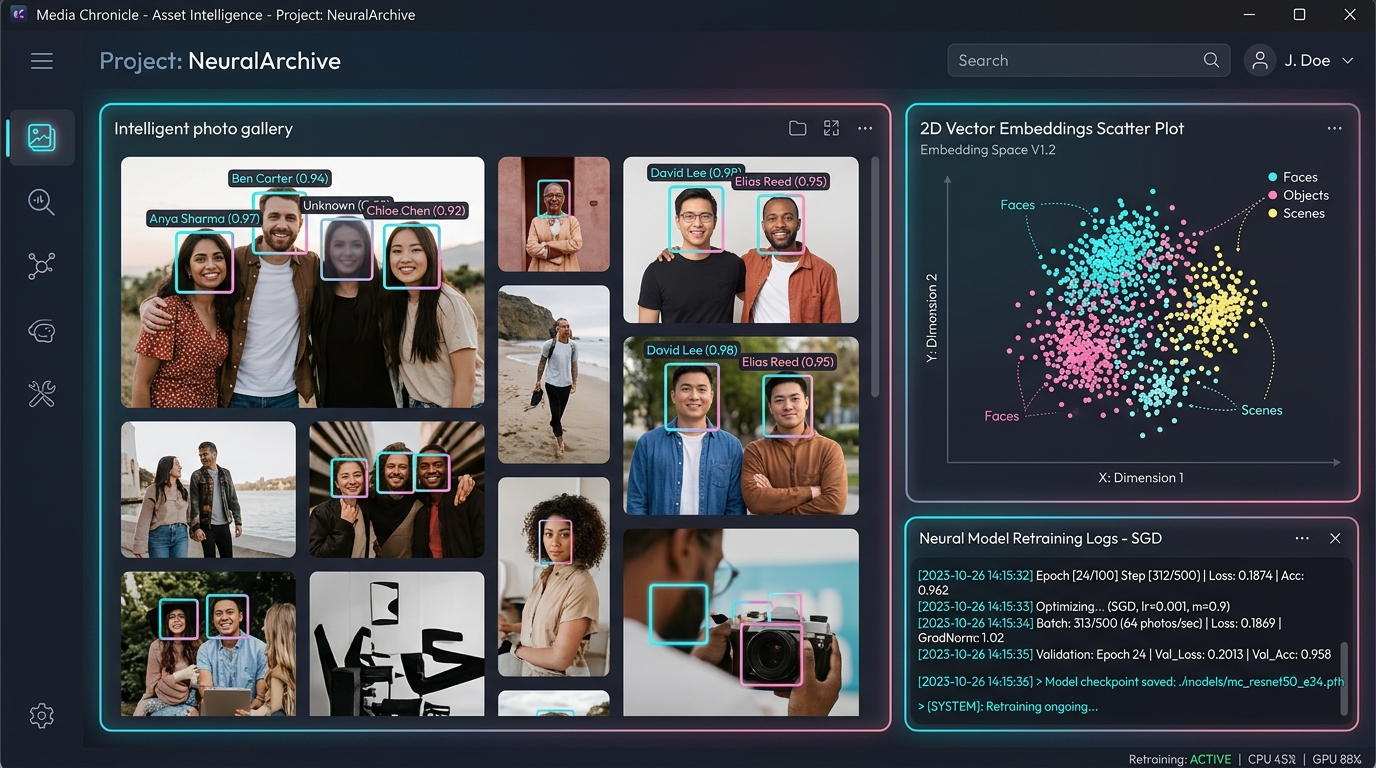
Our native engine indexes EXIF capture dates, camera hardware, and GPS metadata at lightning speed. On-device facial clustering automatically groups recurring family members into albums offline.
Permanent Ownership & Export
You own your library completely. No proprietary lock-in. Export your entire catalog, EXIF tags, and album categories to universal JSON and CSV formats with a single click at any time.
One-Time Ownership vs. Cloud Subscriptions
See how much you save by replacing compounding Google Photos or Apple iCloud monthly subscription fees with Media Chronicle’s one-time $79 lifetime license.
Built for Speed & Total Privacy
Media Chronicle is engineered specifically for large photo collections stored on external drives. Every core feature runs locally on your PC with zero cloud dependency.
Standalone Windows Executable
Packaged as a lightweight, single-click Windows application. Runs out of the box with zero Python environments, Docker containers, or command-line dependencies.
Direct External Drive Scanning
Scans family photo libraries directly on external USB hard drives, SSDs, and SD cards. Zero duplicate file copying, protecting your PC's internal storage.
Sub-Millisecond Preview Streaming
Smooth, stutter-free thumbnail pipeline and instant preview viewing. High-performance LRU caching handles collections of 100,000+ photos effortlessly.
Instant Metadata & Date Search
Search effortlessly across EXIF capture timestamps, date ranges, camera hardware, image resolutions, location tags, and preexisting folder structures in real time.
Local Family Member Grouping
On-device facial recognition clusters recurring family members into organized albums without sending a single photo or byte over the network.
Portable JSON & CSV Export
Zero vendor lock-in. Export your indexed catalog, EXIF metadata, album tags, and media file path registries into open JSON or CSV formats with a single click.
What's Available Now & Planned Ahead
A transparent view of current core capabilities and upcoming features planned for future releases.
Available in v1 (Current Release)
Available NowDirect recursive scanning of NTFS, exFAT, and FAT32 drives without file copying or disk duplication.
Instant masonry grid rendering and preview caching for 100,000+ photo collections.
Sub-50ms filtering by capture timestamp, year/month, camera model, and folder structure.
On-device facial clustering grouping matching family members into private local albums.
Complete data export of catalog entries, timestamps, and album tags with zero proprietary lock-in.
Planned for v2 (Future Updates)
In DevelopmentSearch your collection with everyday natural phrases like "kids opening presents on Christmas" or "sunset at the beach".
Generate smart scene descriptions, object tags, and context summaries completely offline on your own machine.
Automatically group milestone family chapters and vacation journeys into organized chronological story albums.
Easily confirm and link family member identities as children grow into adulthood across decades of family archives.
Air-gapped sync between desktop PCs and home laptops over your local home Wi-Fi with no cloud servers involved.
Test the In-Place Engine & Instant Search
Experience how our in-place drive scanning engine indexes massive storage volumes with zero duplicate disk usage, and test our instant offline metadata search filter.
Direct Drive Ingestion Simulator
Safe Read-Only MountMedia Chronicle never copies photos to your internal C:\ drive. It creates a lightweight catalog directly from connected external storage with fast thumbnail caching and strict deduplication.
Instant Search & Filter Demo
Sub-10ms Local IndexTest how fast Media Chronicle searches your catalog offline. Filter in real-time by capture year, camera model, or album category with instant response.
Get Started in Less Than 60 Seconds
Download the standalone Windows application. Index up to 500 photos in free trial mode, or activate your $79 Lifetime License anytime to unlock unlimited libraries.
Media Chronicle for Windows (x64)
Self-contained installer distributed via official GitHub Releases. Zero Python, zero Docker, and zero external runtimes. Installs and runs 100% offline.
Grab the single Windows installer file hosted securely on GitHub Releases.
Double-click to launch. If Windows SmartScreen appears, click More info → Run anyway.
Connect external HDD/SSD and click Scan In-Place to index your photos offline.
Test Drive Your Disks
- ✓ Index up to 500 family photos for free
- ✓ Test lightning-fast preview streaming on your external drives
- ✓ Verify offline family grouping completely private
- ✓ Zero expiration timer or mandatory signup
Unlimited Lifetime Ownership
- ✓ Unlimited photo indexing (100,000+ photos)
- ✓ Connect unlimited external HDDs, SSDs, & NAS drives
- ✓ 1-click universal JSON & CSV data export
- ✓ Valid on up to 3 PCs in your household with permanent updates
Plug in any external USB HDD, SSD, or camera SD card. Media Chronicle immediately detects the drive volume.
The app scans the drive file tree directly in read-only mode without copying any original photos to your computer.
Browse 100,000+ photos with instant search by date, person, or camera model, completely offline.
Answers for Families & Creators
Everything you need to know about permanent software ownership, drive safety, and zero-cloud privacy.